Storage usage
Open the storage summary
- As an Organization Administrator, open Settings → Storage.
- Review the total bytes, file count, and category breakdown.
- Identify the category contributing the usage you want to investigate.
- Return to that category’s source registry and open the relevant record to inspect its files and retention context.
- Download any generated report your organization needs before its seven-day cleanup period ends.
Categories include third-party artifacts, access-review evidence, evidence-task files, document files, generated reports, and other files. Use the breakdown to identify which business workflow contributes to storage rather than treating all files as interchangeable.
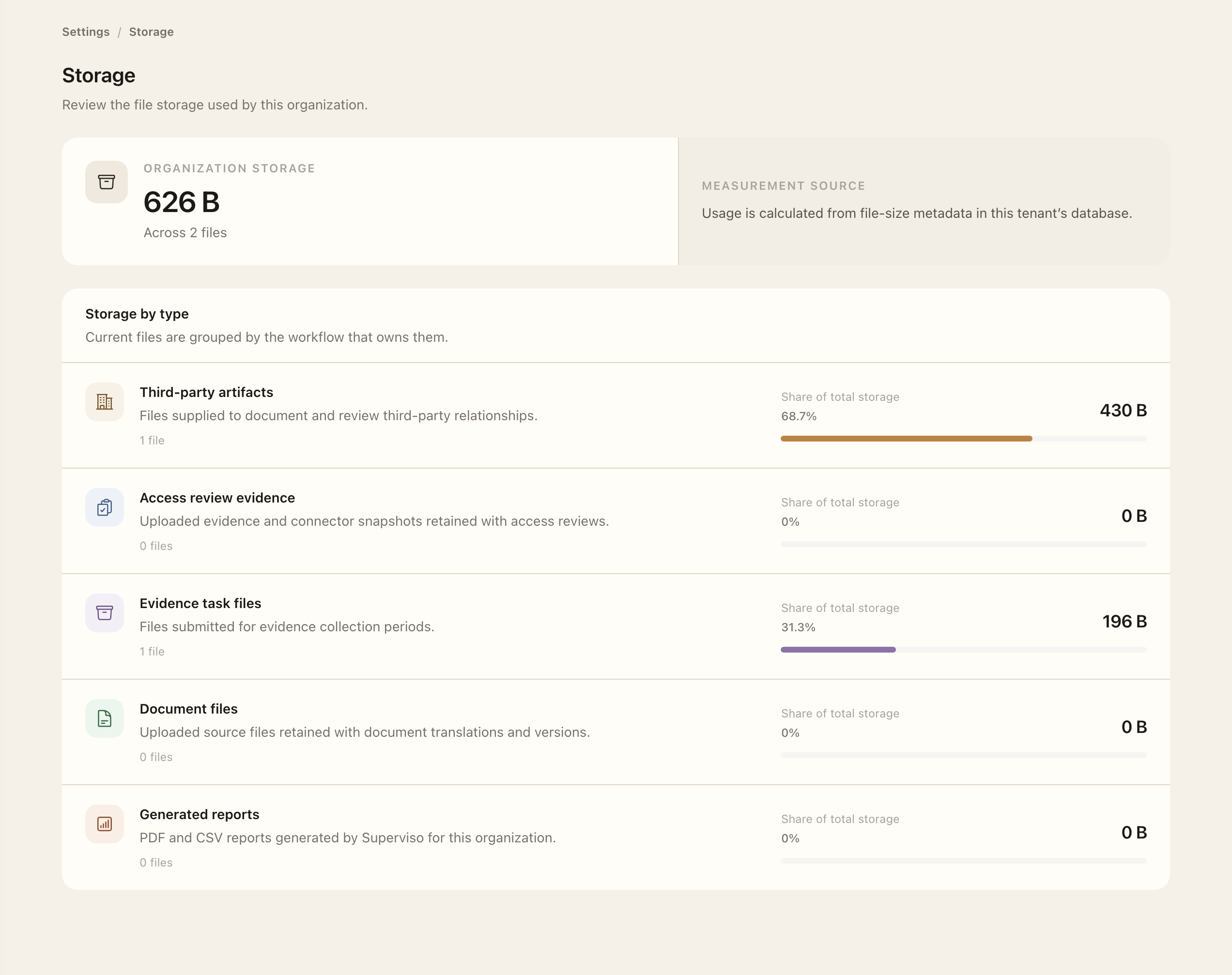
Investigate a category
Return to the relevant record registry to inspect files in their context. A document binary may support a published version; an evidence file may support a completed review. Review the source workflow and retention needs before using its available deletion controls.
The Storage page is a usage summary, not a substitute for source-record permissions or retention decisions. Historical evidence may be protected by its workflow.
Keep needed reports
Generated reports have a seven-day retention period. Download any copy your organization needs before automatic cleanup removes the report and its generated files. Keep exported copies according to your organization's own information-handling rules.
For file submission and evidence context, see Evidence tasks and Assurance artifacts.
Expected outcome
You can identify which workflows contribute to file usage and inspect files through their source records. Viewing Storage does not delete or export files, and it does not override the source workflow’s permissions or retention protections.