My Account
Set your preferences
- Open the account menu and choose My Account.
- Select Profile.
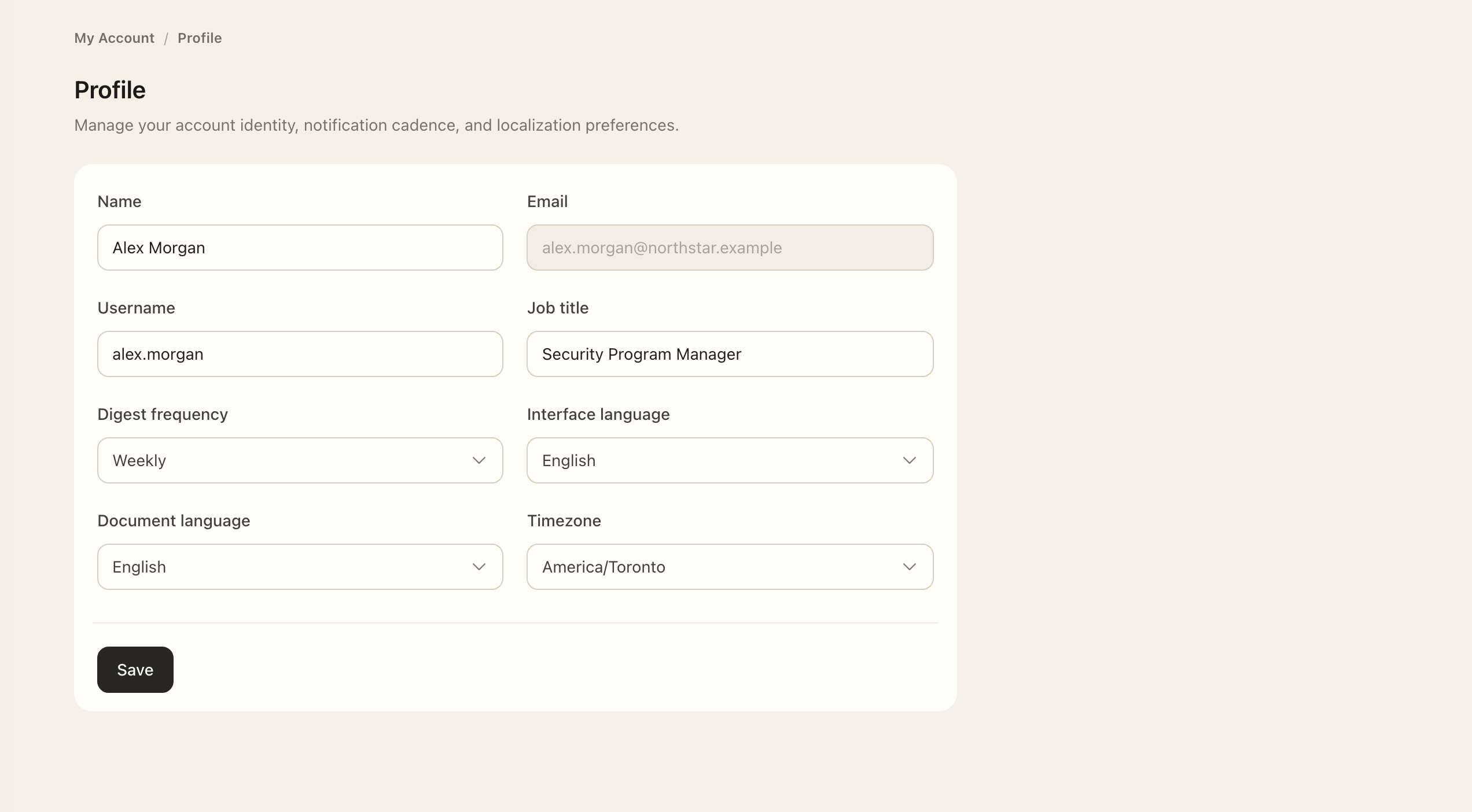
- Set your interface language, preferred document language, and timezone.
- Save the changes and check the saved values before leaving the page.
The interface language controls navigation and application messages. The document language selects a preferred translation when one is available. Your timezone controls date-time display; date-only values remain dates.
If your name and email are managed by an active Identity Source, those fields are read-only. Ask your directory administrator to update them at the source.
Review account security
Use Password and 2FA to manage local sign-in when available for your account. Follow the two-factor setup prompts and keep recovery codes in a secure place. Your organization's SSO policy may make local password and two-factor management unavailable.
Open Sessions to review signed-in sessions and use the available session controls. Open Logs to inspect your own authentication history. Contact your organization if an entry looks unfamiliar; include its time and context.
If you cannot sign in
Use Sign in for the first time for password setup and SSO guidance. Organization support can check whether your account is active and whether your sign-in method is permitted.
Expected outcome
Your saved preferences are used for navigation, available document translations, and date-time display. Directory-owned name and email fields remain read-only. Security controls are available only when your organization’s sign-in policy permits them.