Translations and sources
Open the correct version
From a document, open its version and the translations list. Each translation belongs to that version and language.
Add or edit a translation
- Choose the available add-translation action and select the language.
- Enter the translated title and summary.
- Choose the authoritative source: uploaded content, text maintained in Superviso, or an external URL.
- Save, then inspect the resulting content or download to confirm that the correct source is attached.
- Complete the translation review required by the version workflow before advancing publication.
Use a draft for changes. Reviewed, approved, published, and retired versions remain read-only; later revisions need a new draft version.
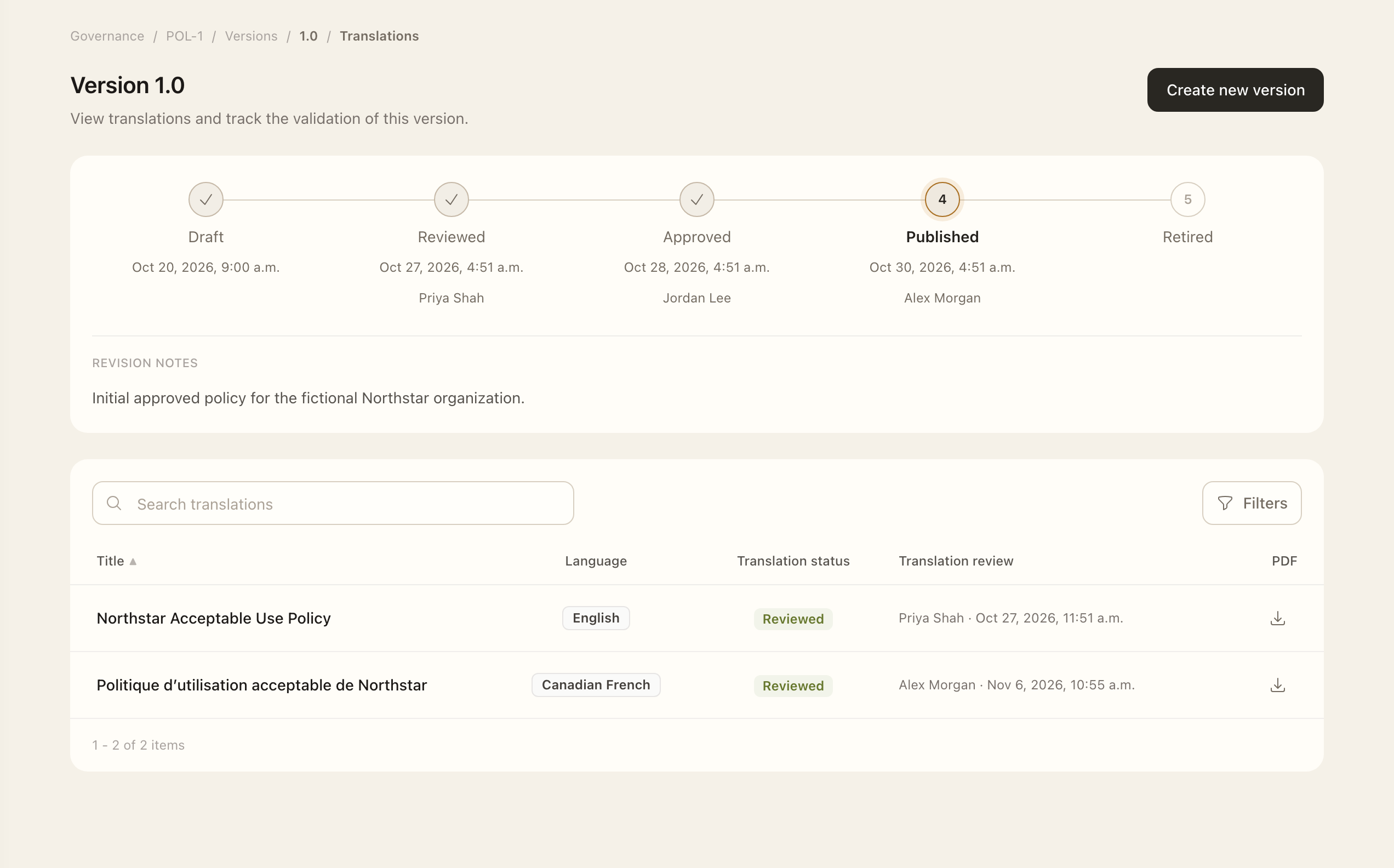
Check the employee experience
The user's document-language preference selects an available translation, with fallback when that language is unavailable. Users can select another available language in the reader.
The source affects reading evidence. Uploaded PDFs require page traversal; Superviso text requires reaching the end; external URLs use explicit confirmation because reading on another site cannot be tracked. See Read and acknowledge documents.
The translation stores its title, summary, and source with the selected version.
Expected outcome
The saved translation belongs to the selected draft version and retains its title, summary, and source. Employees see it only through the published version and their consultation access. Review and publication remain separate from saving the translation.