Access governance settings
Review access governance
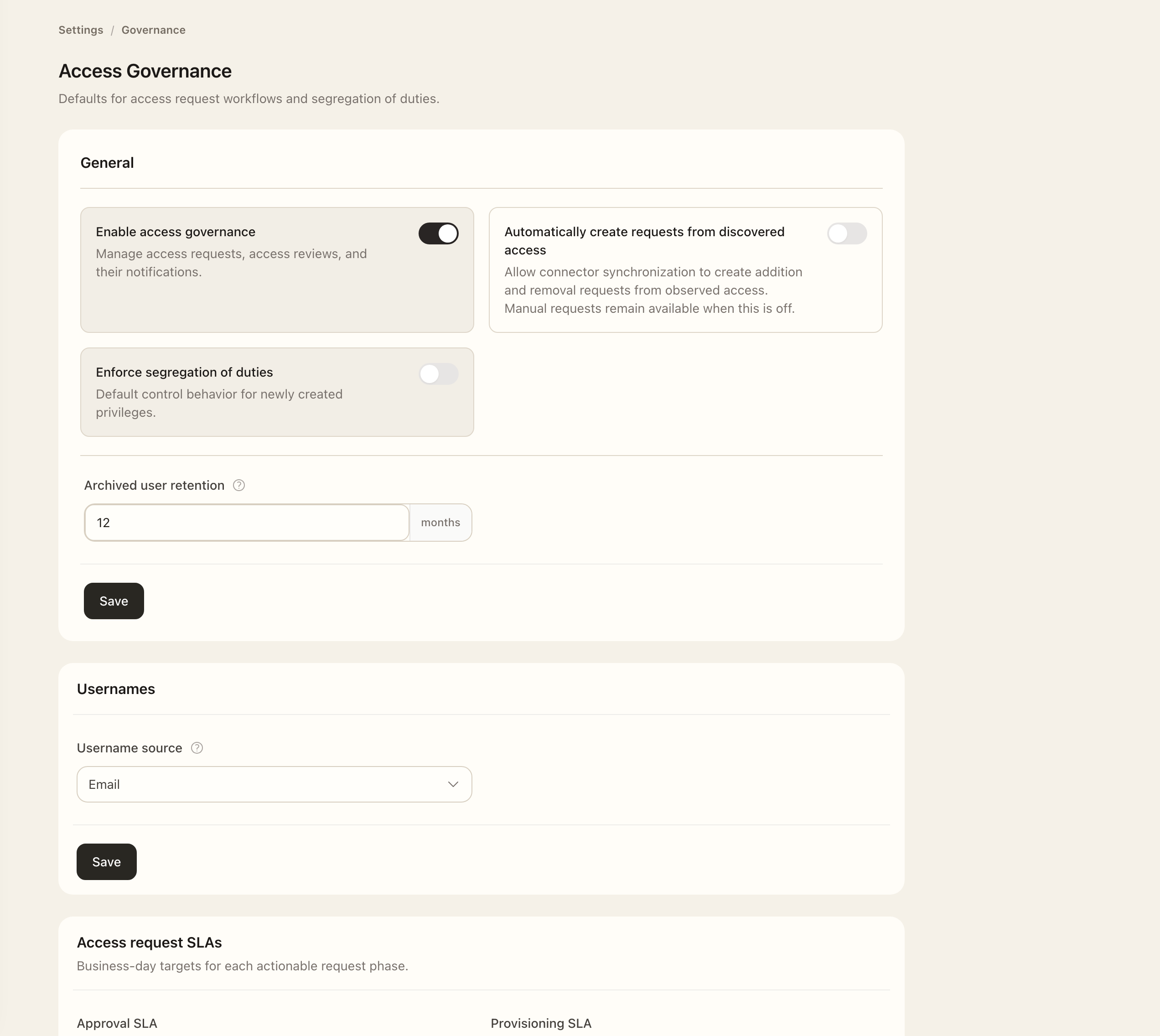
- As an Organization Administrator, open Settings → Governance under Access & Identity.
- Review whether access governance is enabled and read the confirmation before enabling it for existing access.
- Choose whether Automatically create requests from discovered access should be enabled separately.
- Review the segregation-of-duties, request-action SLA, archived-user retention, and username-source settings described below.
- Switches save automatically. Use Save for the other settings you change.
The separate Automatically create requests from discovered access option allows synchronization to create addition and removal requests from observations. Turning that automation off does not remove manual request workflows.
Set the SoD default for new privileges
Segregation of duties (SoD), labelled Separation of duties on a privilege, separates the request participants from its normal approvers.
- Open Settings → Governance under Access & Identity.
- In General, turn Enforce segregation of duties on or off. The switch saves automatically.
- To change an existing privilege, open it under Identity & Access → Privileges, choose Edit, and change Separation of duties under Governance rules.
- Save the privilege. Its overview shows whether the rule is Enforced or Not enforced.
This organization setting is a default for newly created privileges, not a bulk update of existing ones. When a privilege enforces SoD, Superviso excludes the requester and request subject from normal approval routing. Administrator roles retain their administrative override. See Configure separation of duties for an example and approver responsibilities.
Set request timing rules
Configure the available request-action SLA settings. Due dates apply to the current approval or implementation phase; status history retains the timing context from each transition. Use Access requests to inspect an individual case.
Review account lifecycle settings
Set the archived-user retention period in months according to your organization's policy. Archived records show when anonymization is scheduled. Suspension and archival are distinct from irreversible anonymization; see Users and account lifecycle.
The username-source setting affects newly created usernames and does not rename existing users. Confirm the intended email-based or name-based convention before changing it.
Expected outcome
The saved governance settings govern the relevant request and user-lifecycle workflows. Turning off discovered-access automation does not remove manual requests. Check actual request assignments and archived-user dates to verify how the policy applies to a record.