Asset reviews
Start a review
- Open Assets & Data → Assets, select the asset, and open Reviews.
- Start a review or resume the existing active review. Only one can be active for the asset.
- Check the review date, assigned participants, and any independent approval requirement before reviewing its scope.
Asset owners can participate in their own asset’s review without permission to manage the full inventory.
Examine the recorded scope
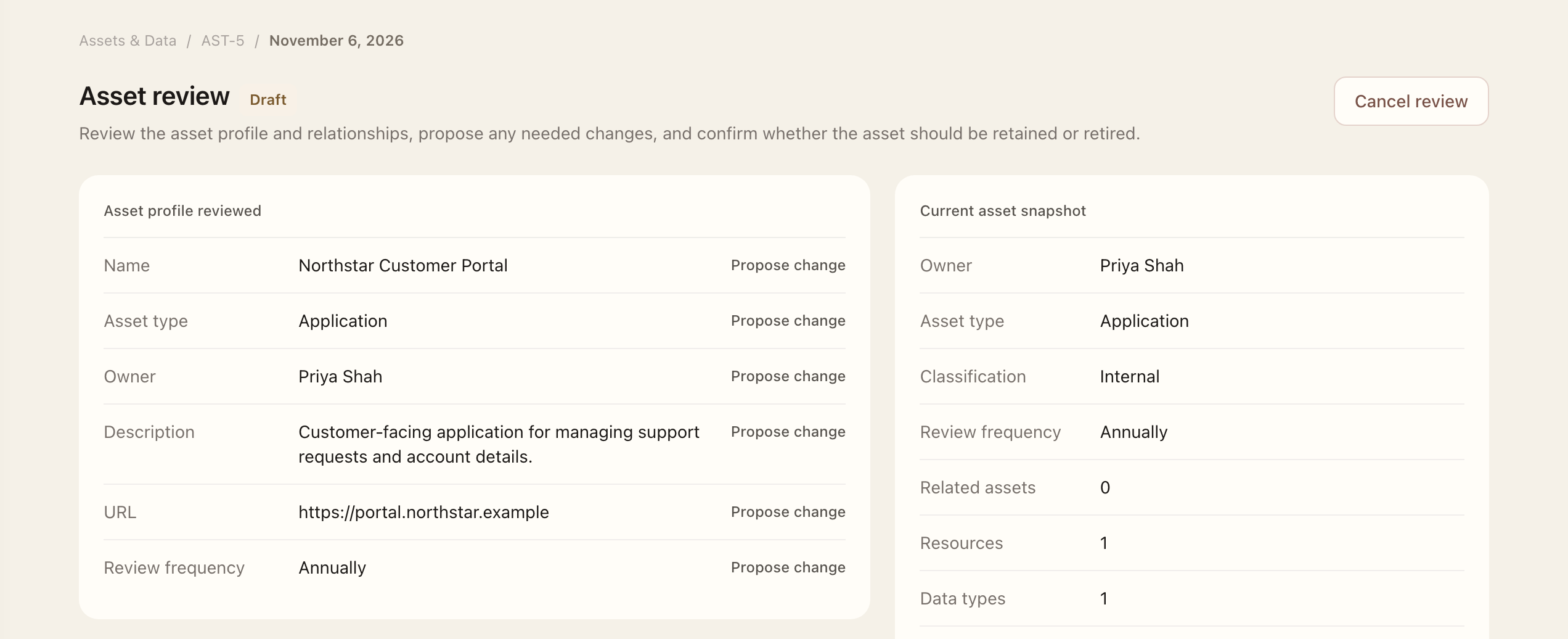
Review the asset profile, resources, data types, data locations, related assets, and third parties. Propose structured changes where the saved context is wrong or outdated. Record whether the asset should be retained or considered for retirement.
Classification is derived from the reviewed data types and resources. Correct those facts when necessary. Connector configuration is outside the review; make connector changes through normal administration.
Complete or submit
- Check the reviewed snapshots, proposed changes, and retain-or-retire decision.
- Use the available completion action when independent approval is not required, or submit to the assigned approver.
- If approval is required, the approver opens the task from My Workspace → Tasks, reviews the proposals, and approves or returns the review.
- After completion or approval, reopen the asset and verify the live profile and relationships.
Approved proposals update the live asset and relationships. Returned or canceled reviews retain proposals and snapshots without applying them. Open a status badge to inspect recorded lifecycle transitions.
Asset reviews check inventory accuracy and continued use. Access reviews separately check accounts and privileges.
Expected outcome
A directly completed or approved review applies its accepted proposals to the live asset. A submitted review still awaits its approver; returned or canceled work keeps its snapshots without applying changes. Reopen the asset’s related pages to verify the resulting relationships.